Let's reduce context bloat and exessive token consumption.
The reasoning behind your code, expressed when it matters.
With Kawa Code we've seen tasks that took 3M tokens and 4 hours be completed in 45 seconds and 590k tokens.
It autonomously organizes the intents and decisions inferred from your prompts and your agents, then injects only the relevant subset — cutting rework, review overhead, and context bloat.
// Free 14-day trial — no credit card required.
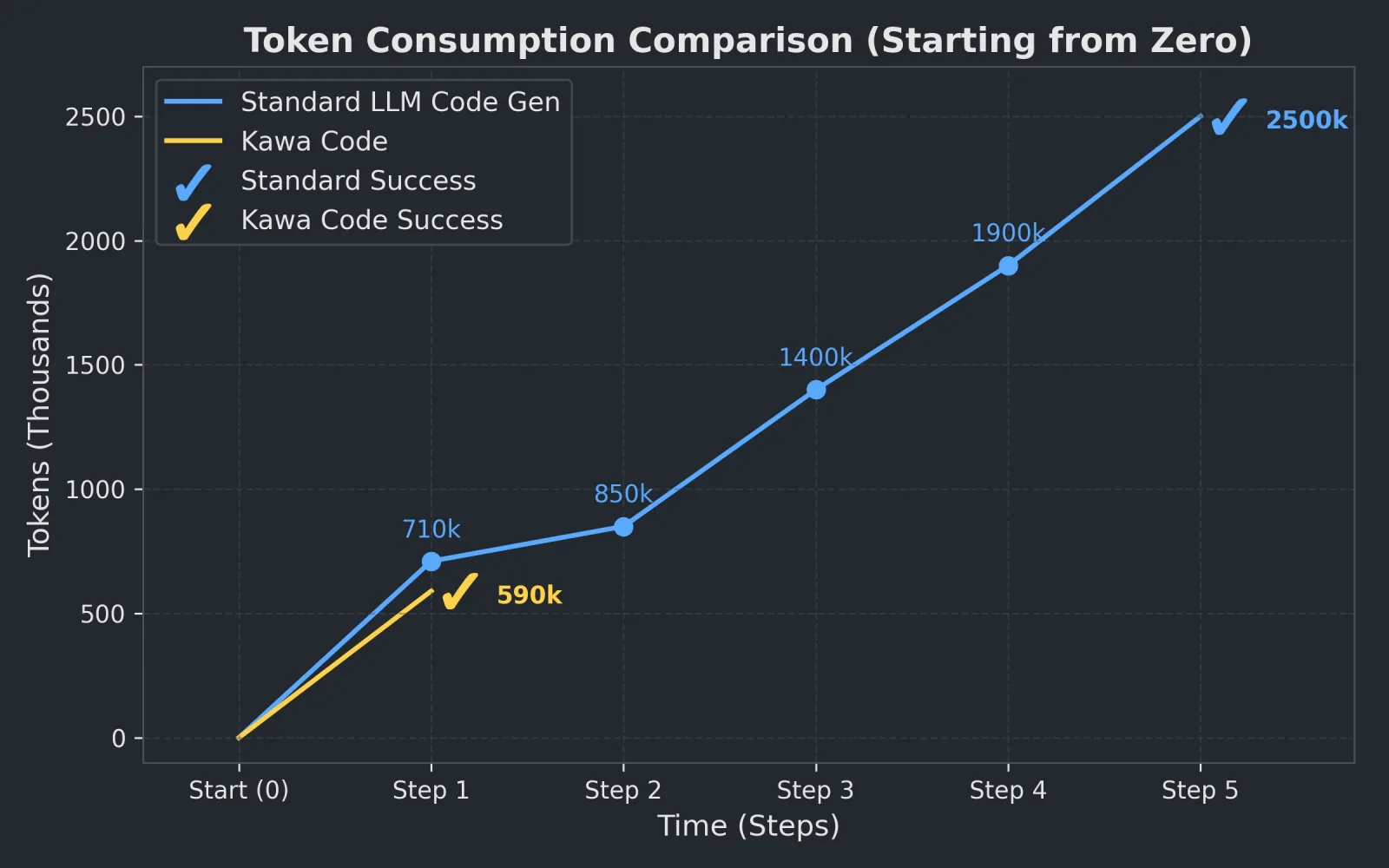
Today's AI tools assume more context = better decisions. That assumption is wrong.
LLMs degrade with context bloat — relevance dilutes, contradictions compound, attention thins, cost climbs. Biology already solved this: no cell dumps its whole genome into every reaction.
Kawa Code makes the opposite bet. We curate. We deprecate. We express only what matters, only when it matters — the way a cell expresses a gene.
Kawa Code: your project's decision genomics.
Built for people and AI
Humans and AI agents, building on each other's decisions and rationale. Kawa Code carries the reasoning and coordination between them.

Solo developers
SoloOne developer, many AI sessions. Kawa Code injects only the relevant bits of information necessary for the AI to do its work efficiently. Even elegantly.
- Automatically extracts intent and micro-decisions from your prompts and from the AI transcript
- Coordinate the work of multiple agents in the Orchestration screen
- Quietly keeps an up-to-date Features list — both technical and user-facing
- Zero-knowledge system: the API cannot read your code
- English not your language? Kawa Code translates the code into your native language for easier reading

Engineering teams
TeamsShared intents and shared decisions across the team.
- Conflicts and code intersections surface and resolve before you even commit
- AI work decisions immediately become relevant context for everyone else on the team
- For existing projects, run
infer historyto extract intents and decisions from the project's history - Quietly keeps an up-to-date Features list — both technical and user-facing
- Zero-knowledge system: the API cannot read your code — all diffs are encrypted
- Use it without AI too — efficient trunk-based development (VS Code, Vim, Emacs, and IntelliJ extensions)
- International teams get AI translation of intents, decisions, and code into each user's native language

AI coding agents
AgentsAgents receive only the relevant past decisions, injected at the moment of work — less context bloat, fewer wrong turns.
- Acts as a master coordinator between several agents working on your monorepo
- Agent conflicts are resolved with high confidence, or surfaced for your decision — see the Orchestration screen
- Each agent talks to Kawa Code at every step to pull the context relevant to its work
How Decision Genomics works
Four pillars, working as one. Capture the why, curate it over time, surface only the relevant subset, and align humans and agents around it.
Automatic instrumentation
Decisions are extracted from communication channels, code, and AI conversations. The team doesn't write reasoning down — the system captures it from the work you're already doing.
A self-pruning layer
Structured types, an evolution graph, deprecation. The decision layer prunes itself — instead of accumulating monotonically like every other AI-memory tool.
Just-in-time context
Relevant decisions appear at the moment of work — pinned inside your agent's workflow — not when you remember to search for them.
Conflict & intersection detection
Conflict and intersection detection across the team — flagging structural drift and cross-team dependencies before merge time, before architectural drift.
Kawa Code knows your intents, every little decision your AI makes,
and tells the AI only what it needs to know.
Where Decision Genomics sits
Memory tools recall. Context tools inject. Orchestrators coordinate. None of them structure or evolve the reasoning behind your code — that's the layer Kawa Code adds.
| Layer | What it does | Who's here today |
|---|---|---|
| Long-term / vector memory | Generic recall of past text. | mem0, Letta, RAG |
| Context injection | Feeds stored context blindly into the prompt. | Cursor rules, Memory MCP |
| Agent orchestration | Coordinates agents on a task. | Agent frameworks |
| Decision Genomics | Structures & evolves the reasoning behind changes — expresses only what matters, and aligns humans + agents around it. | Kawa Code · the missing layer |
A wiki remembers. Kawa Code reasons with you.
Is it earning its value?
Kawa Code works quietly in the background. Here's how to tell it's paying off.
- Your agent stops asking you to re-explain settled decisions — it already has them.
- Conflicts surface before a merge, not after — while two people's work still differs in the editor.
- Returning to old code is faster, because the intent and decisions come back with it.
- The Orchestration panel fills with decisions you'd want a teammate to read — not boilerplate.
"How did Kawa Code help in this session? Which intents, decisions, or past context did you use, and what would have been harder without them?"
One reflective question at the end of each big task is the easiest way to keep an honest read on the value you're getting — and it's the same question that gives you something concrete to bring to a decision-maker.
Prefer to run it all yourself? You can.
Most teams start with the hosted service. If your policies require it, the API, the desktop app, the MCP server and the editor extensions can also run entirely inside your network — including fully air-gapped environments.
- Air-gapped when you need it — on-prem needs no outbound connection to us or to any third party.
- Every component, on-prem — if you opt in, the hosted API is replaced by your own deployment; your decisions and code diffs stay on hardware you control.
- Local models for AI conflict resolution — optionally pair it with a local model (Ollama) so no code reaches an external model provider.
Download Kawa Code
Start building with memory. The desktop app ships with an MCP server for Claude Code, Cursor, and Windsurf.